Ultimate Guide to Inventory Verification Before Listing Accommodations
Ensure your accommodations are accurately listed by following this step-by-step guide to verify inventory, pricing, and availability before booking.


Connected inventory is not necessarily ready to book. An integration can transmit unit information successfully while the published offer still contains incomplete pricing, unclear deposit terms, outdated availability, or missing restrictions.
Verification starts with a consistent scenario: the same accommodation, dates, occupancy, and conditions. Without that context, two prices or calendars may appear to conflict simply because they describe different offers. This guide gives property operators and partners a practical checklist for comparing source information, received data, and the offer a customer actually sees.
What Inventory Verification Means
Verifying connected inventory means checking that the accommodation, pricing, restrictions, and availability remain consistent from the source through to the published listing. It also means assigning responsibility for investigating and correcting discrepancies.
An API connection enables data exchange. It does not, by itself, confirm that the information is complete or suitable for a particular booking. The review must establish what is transmitted, in which direction, how often it updates, and how it relates to the reservation process.
A technically valid response might describe a property category rather than a specific unit, omit a charge, or contain conditions for another period. Define the test scenario before comparing the results.
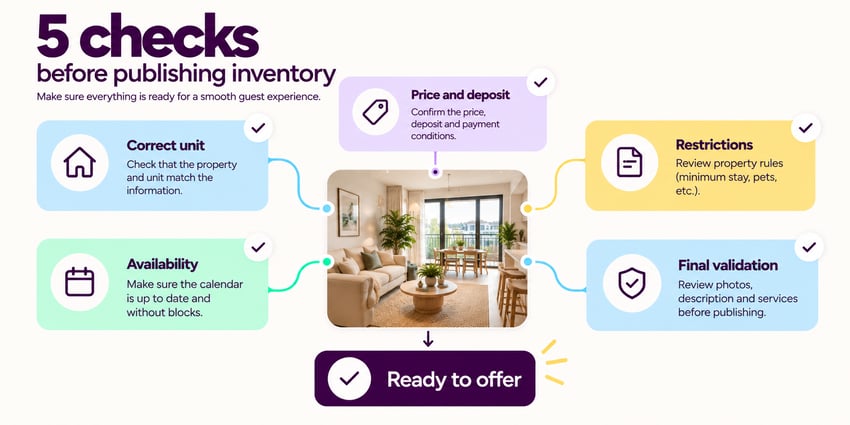
Quick Checklist: Five Checks Before Listing
- Match the accommodation. Confirm that the source and receiving systems refer to the unit or category actually offered.
- Review pricing components. Check currency, calculation rules, deposits, fees, and the information displayed to the customer.
- Test stay rules. Apply minimum-stay requirements and restrictions to the selected dates and occupancy.
- Check availability. Review data freshness, status definitions, and the steps required to confirm a reservation.
- Verify corrections end to end. Assign responsibility, resolve the cause, and check the published result.
Compare the Source, Received Data, and Published Offer
Keep the accommodation, dates, occupancy, and booking conditions fixed throughout the test. Then compare three points:
- Source information: the reference data and applicable business rules.
- Received information: what the integration delivers to the receiving system.
- Displayed offer: what the customer sees for that scenario.
Document discrepancies with the relevant evidence and a person responsible for follow-up. Where a deliberate transformation applies, such as currency conversion or prorating, verify the rule rather than expecting every value to be identical.
1. Confirm the Accommodation Matches
An apartment, room, bed, and property category are not interchangeable, even when they share a name or photographs. Maintain a reliable correspondence between systems and check location, accommodation type, capacity, and included features. If the source groups inventory by category, establish how a specific unit is assigned and which characteristics are guaranteed by the offer.
Also check for duplicate records and listings that should have been removed. Publishing and reservation teams need to understand exactly what inventory each reference represents.
2. Separate Price, Deposit, and Fees
A price only makes sense with its currency, calculation period, dates, and occupancy. A monthly rate cannot be compared directly with a total stay amount unless the applicable calculation is defined.
Review any currency conversion, rounding, prorating, or commercial adjustment against the displayed result. A currency code identifies the currency; it does not explain how an amount was converted. Keep the accommodation price, deposit, and other charges distinct. Confirm:
- What the base price includes and what appears separately.
- Which charges are mandatory, optional, or conditional.
- Whether utilities are fixed, capped, or calculated later.
- When each amount is payable to whom.
- How the deposit is calculated and what conditions apply.
- Whether the deposit is clearly distinguished from a non-refundable charge.
An empty value does not automatically mean zero. It may indicate that a charge does not apply, that information is missing, or that it is handled elsewhere. Check the integration documentation and confirm the interpretation with the person responsible for the source information before publishing the terms.
3. Apply Minimum-Stay Rules and Restrictions
Check the requested period against the applicable stay rule. Establish whether the requirement is measured in nights, days, or months, and how it applies when a stay crosses periods with different conditions.
Identify which restrictions pass through the integration and which require another process. Missing transmitted information should not be treated as evidence that no restriction exists. Test both an eligible scenario and one that fails the rule. The results should show whether the published offer reflects the restriction and how the booking process handles it.
4. Check Availability for the Requested Dates
A published listing is not proof of availability. Interpret the received information alongside the reservations, blocks, preparation periods, and stay rules included in the inventory model. Check when the data was last updated and how the system behaves if the source is unavailable or an update fails. Older information should not be treated as current confirmation. Any fallback process must make its limits clear and define what needs rechecking.
Keep these actions distinct:
- Checking availability.
- Presenting or holding a proposal.
- Blocking inventory.
- Confirming a reservation.
Their behavior depends on the integration and the agreed workflow. Do not assume that an initial availability inquiry holds the unit. Revalidate at the appropriate step before making a booking commitment.
5. Assign Responsibility and Verify the Correction
A discrepancy can originate in source information, unit mapping, calculation rules, synchronization, or publication. Assign someone to investigate it and identify who can make the correction. These may be different roles. Record the cause, action taken, and verification result. After the change, repeat the same test scenario and check the customer-facing offer, not only the received data.
Correcting the listing manually may hide a problem that returns with the next update. Resolve the underlying cause or document how the publishing process intentionally handles the difference. Verification is complete only when the corrected result is reflected appropriately across the relevant stages.
When to Repeat the Review
Initial verification does not establish permanent accuracy. Define which changes require a new check and which details must be reconfirmed before committing to a stay.
Review triggers may include:
- New, removed, or remapped units.
- Changes to rates, deposits, fees, or included services.
- Updated minimum-stay requirements or restrictions.
- Changes to the integration or calculation rules.
- Failed updates or unexpected discrepancies.
- Stay changes that affect availability or agreed conditions.
Combine change-triggered reviews with periodic checks proportionate to operational risk. After a reservation, preserve the agreed terms and distinguish a requested modification from an accepted change.
Connect Inventory and Operations With Floweal Management
For teams managing accommodation portfolios, Floweal Management centralizes inventory, calendars, reservations, digital contracts, and accommodation operations. We connect property information with the context of each stay and the work that continues after confirmation. Across multiple properties, teams, and partners, that shared operational context supports coordination without relying on disconnected records.
Centralization does not replace verification. The operation still needs clear data responsibilities, defined booking rules, and checks that connect source information to the offer being made. Discover Floweal Management to explore how inventory, reservations, and daily operations can work within one connected flow.
Frequently Asked Questions
-
Does a Successful API Response Mean a Booking Can Be Confirmed? Not necessarily. It confirms that the request returned a response successfully, not that every booking condition has been met. Verify the accommodation, dates, pricing, restrictions, and availability through the agreed confirmation process.
-
Does an Empty Deposit Value Mean No Deposit Is Required? No. It may mean the information is missing, not transmitted, or managed separately. Confirm its meaning with the relevant documentation and the person responsible before presenting an offer without a deposit.
-
Must Values Be Identical in Both Systems? Not always. Defined currency conversion, prorating, or commercial adjustments can produce valid differences. The result should be traceable to an agreed calculation rule and displayed consistently with the applicable terms.
-
Who Should Correct a Discrepancy? The responsible party depends on its cause. Source data, accommodation mapping, transformations, synchronization, and publication may be managed by different teams. Assign investigation and correction responsibilities, then repeat the test to verify the outcome.
Verify the Offer, Not Just the Connection
The practical standard is consistency for a defined booking scenario. The unit, dates, terms, restrictions, and confirmation process should describe the same offer from source to publication. A working connection is the starting point. A verified offer is the result of clear rules, responsible follow-up, and an end-to-end check.
We make it flow.
EXPLORE RELATED TOPICS